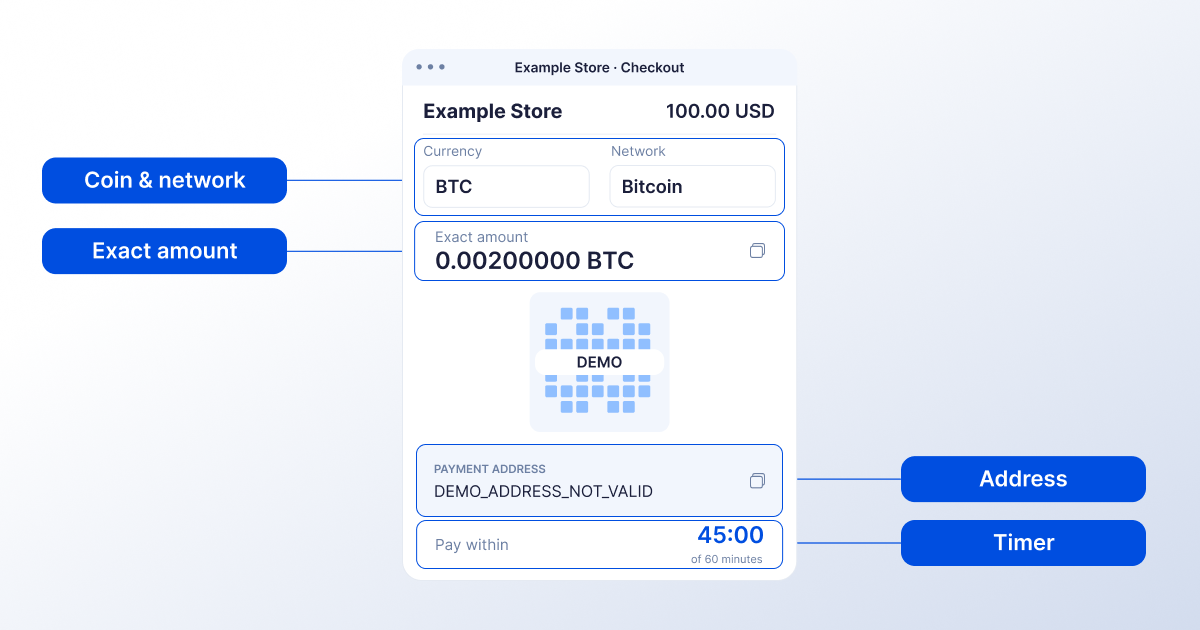
When you choose Bitcoin at an online checkout, the store gives you an invoice with three things: an address, an amount and a time limit. You send that exact amount to that address from your wallet before the time is up. Once the store’s system sees the payment, your order is marked as paid.
Below we explain how to pay with Bitcoin step by step, what to check before you send and what to do if a payment doesn’t go through. The same steps work for Ethereum, USDT and other coins.

Before you pay: check the wallet, invoice and network
Run through this list before you open your wallet app.
Paying from an exchange account? Make sure the exchange supports withdrawals on the network the invoice asks for, and find out how long its withdrawals take. Some exchanges hold withdrawals for a review, and the invoice can expire while you wait.
A custodial wallet is an account where a company, such as an exchange, holds the coins for you. A self-custodial wallet is an app where only you control the keys. Both can pay an invoice.
Never share your recovery phrase or private key. No merchant, support agent or payment company needs them to complete a payment. Anyone who asks for them is trying to take your funds.
How to pay with Bitcoin online, step by step
You can follow the payment yourself. Paste the TXID into a block explorer such as mempool.space for Bitcoin or Etherscan for Ethereum, and watch the confirmations grow with each new block.
Some older guides still tell you to give the seller your wallet address so they can take the payment from it. Crypto payments work the other way around. You always send to the address on the invoice, and a merchant cannot pull funds out of your wallet.
How to pay with COINPAYMENTS
Many online merchants use COINPAYMENTS to accept crypto. If you see it at checkout, the flow looks like this:
In the standard COINPAYMENTS checkout, the price quote is held for 60 minutes from the moment you open it, and the timer on your screen shows how much of that time is left. The payment has to be confirmed on the network within that window. A transaction sent in the last minute can miss it when the network is busy, so for a large order, leave yourself a buffer. Funds that arrive after the timer ends are refunded to you automatically.
You do not need your own merchant account to pay an invoice. A wallet or exchange account with the right coin is enough. COINPAYMENTS serves customers across the United States.

Paying a merchant versus sending someone crypto
Crypto can reach a seller in three different ways, and each one gives you a different kind of proof that the payment went through.
To pay someone with crypto directly, you need their verified address and the network they use. Ask them to send it in writing, and test with a small amount first if the sum is large. There is no invoice here, so nothing matches the payment to an order for you. Be careful with strangers. The FTC points out that crypto payments typically are not reversible and do not come with the legal protections of a card payment.
PayPal uses the third model. Its checkout with crypto lets eligible US customers sell crypto held in a PayPal balance account and pay the merchant in dollars. Sending crypto from PayPal to an outside wallet is a separate feature.
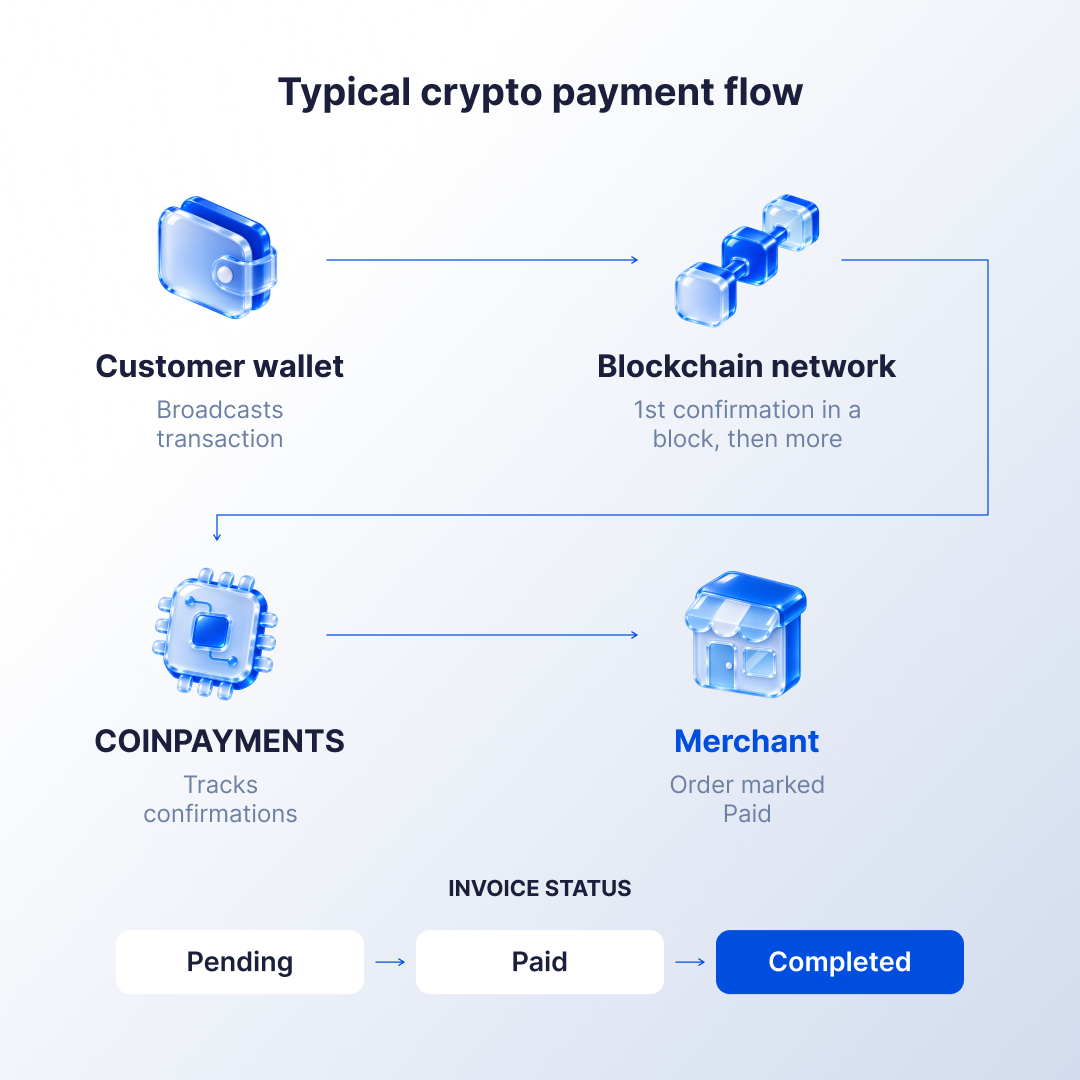
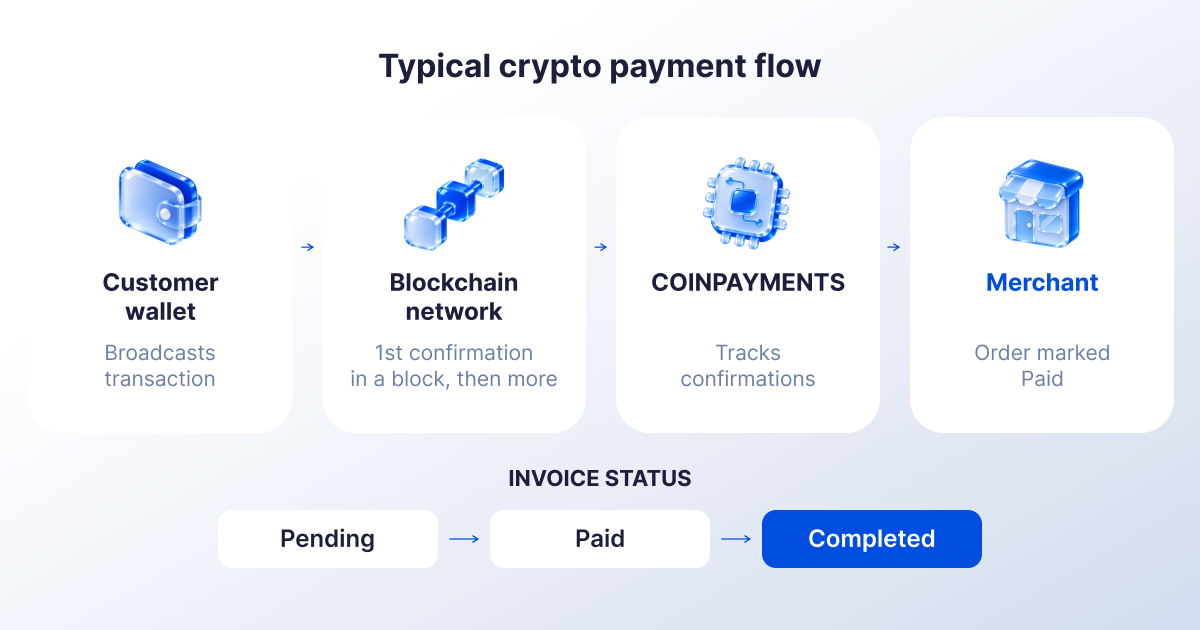
A crypto payment usually moves through these stages. Your wallet broadcasts the transaction to the network. The network adds it to a block, which is the first confirmation, and more confirmations follow with each new block. Then the merchant's system sees enough of them and updates your order. Public blockchains record every transaction, so payments are not anonymous. As bitcoin.org explains, a Bitcoin transaction cannot be reversed. Only the person who received the funds can send them back.
Paying with Ethereum and other supported assets
The steps for paying with ETH are the same as for Bitcoin. The difference is in the network and fee checks.
Stablecoins are handy for payments because their price is designed to stay close to $1. They still have network fees, and our guide to what gas fees are explains why those fees rise and fall. USDC alone runs on dozens of blockchains, while a merchant may accept it on only one or two of them. Send only the asset and network listed on the invoice.
What to do when a crypto payment goes wrong
If a payment hasn't gone through, find your case below.
Underpayments often come from exchange withdrawal fees. You enter the invoice figure, the exchange deducts its fee, and the merchant receives less. If you pay from an exchange, check whether the fee is added on top or taken from the amount.
COINPAYMENTS refunds late payments, underpayments and overpayments automatically. You get an email with a claim link and enter a wallet address on the same network you paid from. The network fee is deducted from the refund, and an amount smaller than that fee can't be sent back on-chain.
Before you contact support, collect the invoice ID, the TXID, the network, the amount and the time you sent it. Support will never ask for your recovery phrase or private key.
Records to keep for a US crypto purchase
The IRS treats crypto as property. Spending it on goods or services counts as a disposal, so you may have a taxable gain or loss, just like when you sell it. Keep these records for each purchase:
A tax professional can tell you how this applies to your situation.
Can I pay with Bitcoin without a wallet?
Yes, you can pay with Bitcoin without a separate wallet app if you hold your Bitcoin in a custodial account, such as a crypto exchange. The exchange runs the wallet for you and sends the coins to the invoice address when you make a withdrawal.
Before you pay, check that the exchange supports the network on the invoice and that its withdrawal time fits inside the invoice timer. Also check whether the withdrawal fee is taken out of the amount you send.
Can I use PayPal to pay with Bitcoin or Ethereum?
Yes, eligible US customers can use Bitcoin, Ethereum and other crypto held in a PayPal balance account at stores that offer PayPal checkout. PayPal sells the crypto at checkout and pays the merchant in dollars, so the store receives a regular PayPal payment.
You can use only one cryptocurrency per purchase, according to PayPal's help page on crypto at checkout. To pay a crypto invoice from another merchant, such as a COINPAYMENTS checkout, PayPal lets eligible users transfer crypto to an external address. Check the network before you send.
Where can I pay with crypto?
You can pay with crypto at online stores, travel sites, software services, gaming platforms and luxury retailers that show a crypto option at checkout, either through their own wallet address or through a payment processor such as COINPAYMENTS. The checkout page is the most reliable place to see which coins work.
Lists of stores that accept Bitcoin go out of date quickly. Merchants add and drop coins, and some accept a coin on one network only.
How long does a crypto payment take?
In most cases it takes from a few seconds to about half an hour. A Lightning or Solana payment often goes through in under a minute. Regular Bitcoin is slower because a new block appears about every 10 minutes, and many stores wait for at least one confirmation. When the network is busy, it can take over an hour.
Your fee matters too. If you set a low fee, the network may pick up your transaction later. On a COINPAYMENTS invoice you can follow the status. It shows Pending while the network confirms the payment, then Paid, and Completed once the funds reach the merchant.
Is paying with crypto the same as accepting it?
No. To pay, you only need a wallet or an exchange account with enough coins, plus the invoice from the store. To accept crypto, a business has to sign up with a payment provider, add crypto to its checkout and decide whether to keep the coins or convert them to dollars.
Make every crypto payment easy to get right
Accepting crypto on your own site? Give your customers a checkout that makes every one of these steps clear.
[Explore COINPAYMENTS checkout]