Cryptocurrency for e-commerce: costs and setup
In the United States, regular credit card payments typically cost around 3% of the order amount for online stores, including percentage and fixed fees. Crypto processing fees are often lower, but that doesn’t automatically make crypto cheaper. You also need to count conversion fees, payout costs, and the time your team spends processing refunds and customer requests.
Adding cryptocurrency for e-commerce is usually the easy part. Most e-commerce platforms add crypto payment functionality through plugins, hosted checkout pages, or APIs, while the rest of the store remains the same. This guide will use a $100 order as an example to demonstrate the cash flow, then cover setup, refunds, and what needs to be tested before launch. Cards stay at checkout; crypto becomes one more payment option.


What changes occur when customers pay with cryptocurrency?
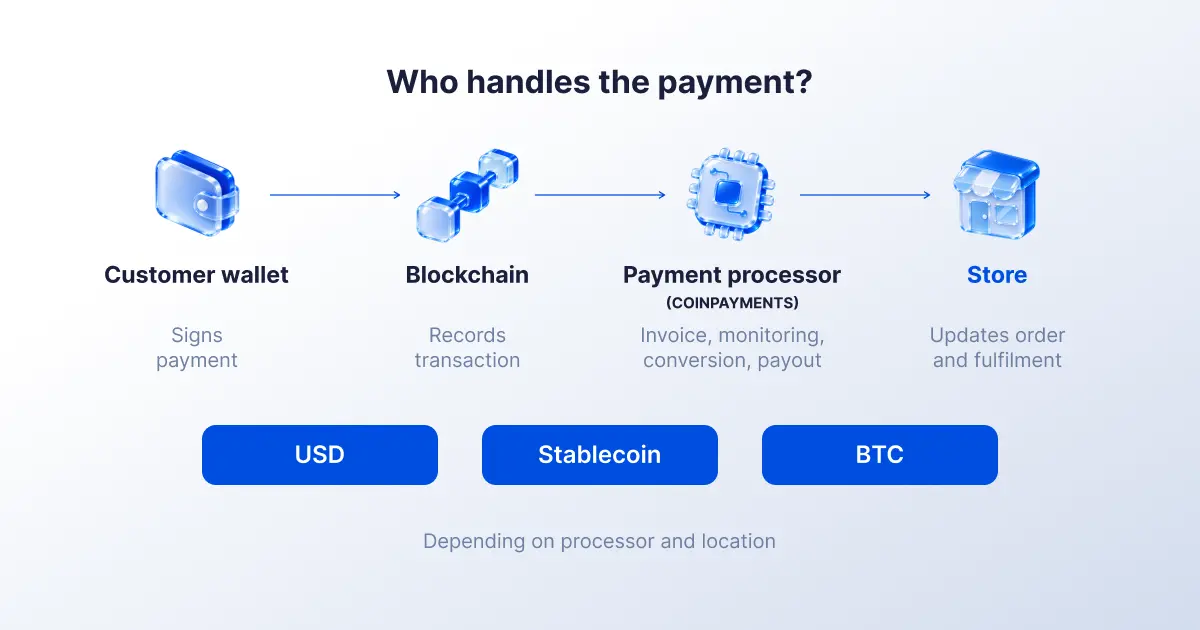
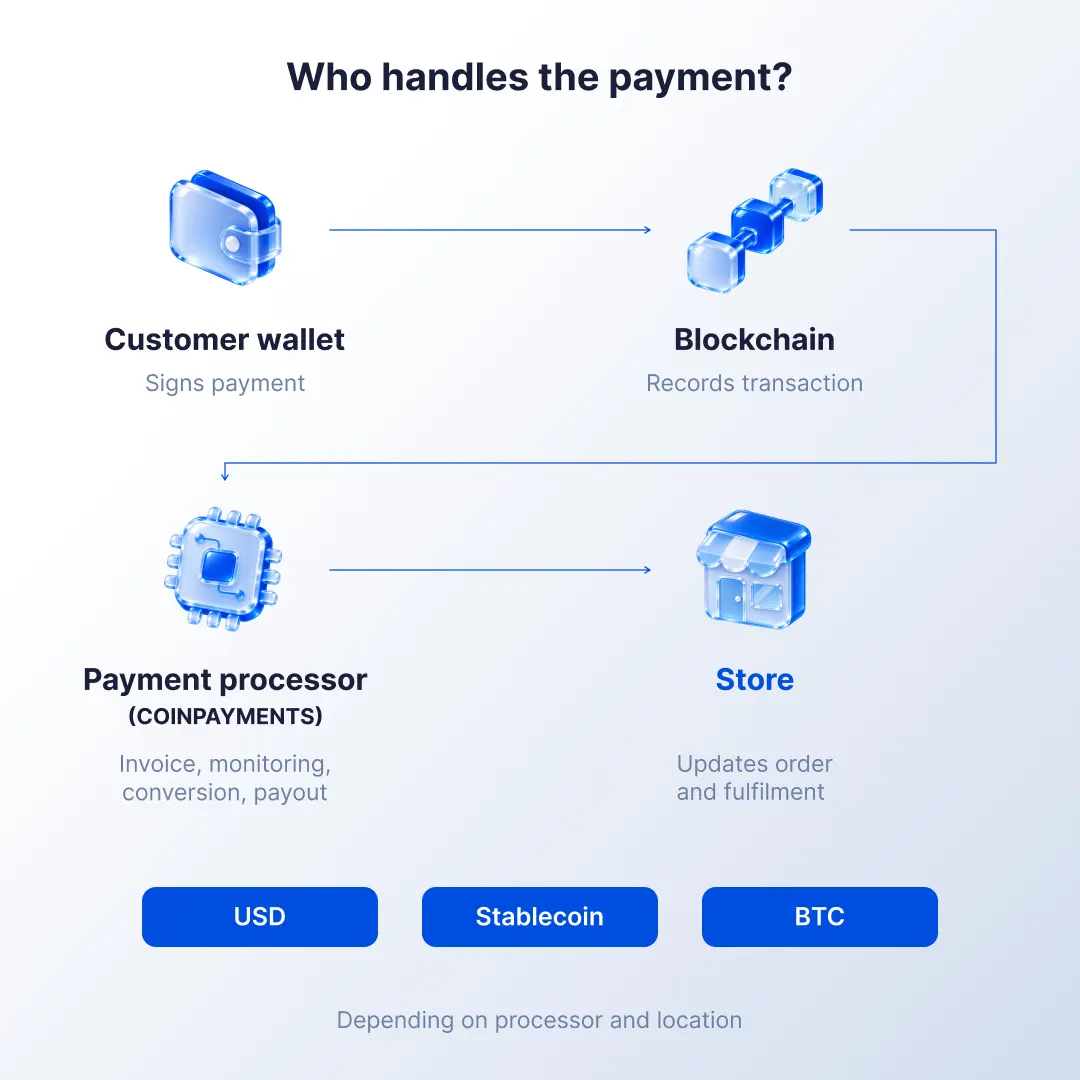
A cryptocurrency ecommerce checkout process has three parts.
The coin a customer sends and the money you ultimately receive do not have to be the same. Customers can pay in Bitcoin, while you can receive USD, stablecoins, or Bitcoin itself, depending on your payment processor and location. Currency conversions incur fees. If you hold Bitcoin, its price may change before you sell it.
When is crypto e-commerce right for your store?
Some merchants have benefited greatly from crypto payments, while others have seen almost no business using them. Usually, it pays off in the following cases.
Accepting foreign credit cards is generally more expensive. Many payment processors charge extra fees for international credit cards and additional fees if they require currency exchange. If a customer disputes a transaction, in addition to a refund, you will typically have to pay a dispute processing fee.
Cryptocurrencies bring some extra work. Your customers need a wallet and they need to know how to use it. Refunds need to be processed manually. If you hold these cryptocurrencies, their value can drop, and trading them can incur fees. And, if no one has asked you any questions about cryptocurrencies so far, adding a new button probably won’t make much difference.
Bitcoin e-commerce payments or stablecoin payments: which should you accept?
You don’t need a long list of ecommerce cryptocurrency payment options. Bitcoin plus one or two dollar stablecoins will satisfy most customers.
Stablecoins are designed to remain fixed at $1, but whether a particular stablecoin can achieve this depends on its issuer and the reserves it has. Network conditions also play a role. USDC operates on dozens of blockchains, and the list of supported Tether networks for USDT is long too. If a customer sends tokens through a network you don't support, the money may never reach your account.
Ask your customers what currency they actually hold, or review the requests you've received. Then, confirm that your payment processor supports this currency and network, and that the payment method meets your accounting requirements. The COINPAYMENTS coins and fees page lists all supported assets. If your buyers mainly have Bitcoin, start with Bitcoin even though stablecoins are easier for bookkeeping.
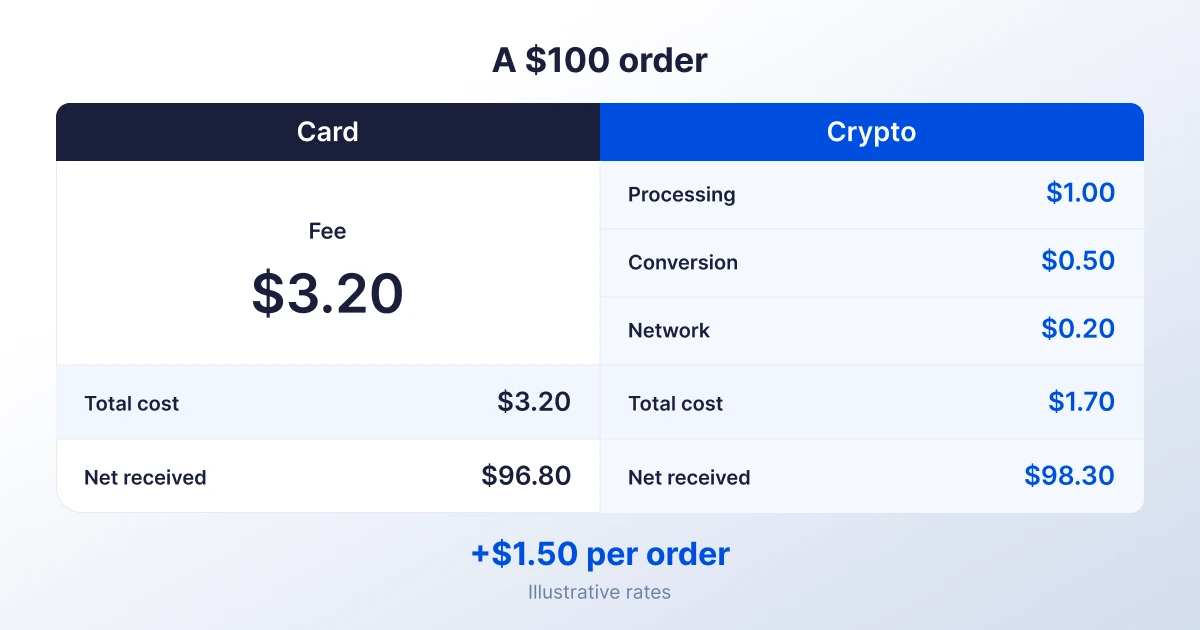
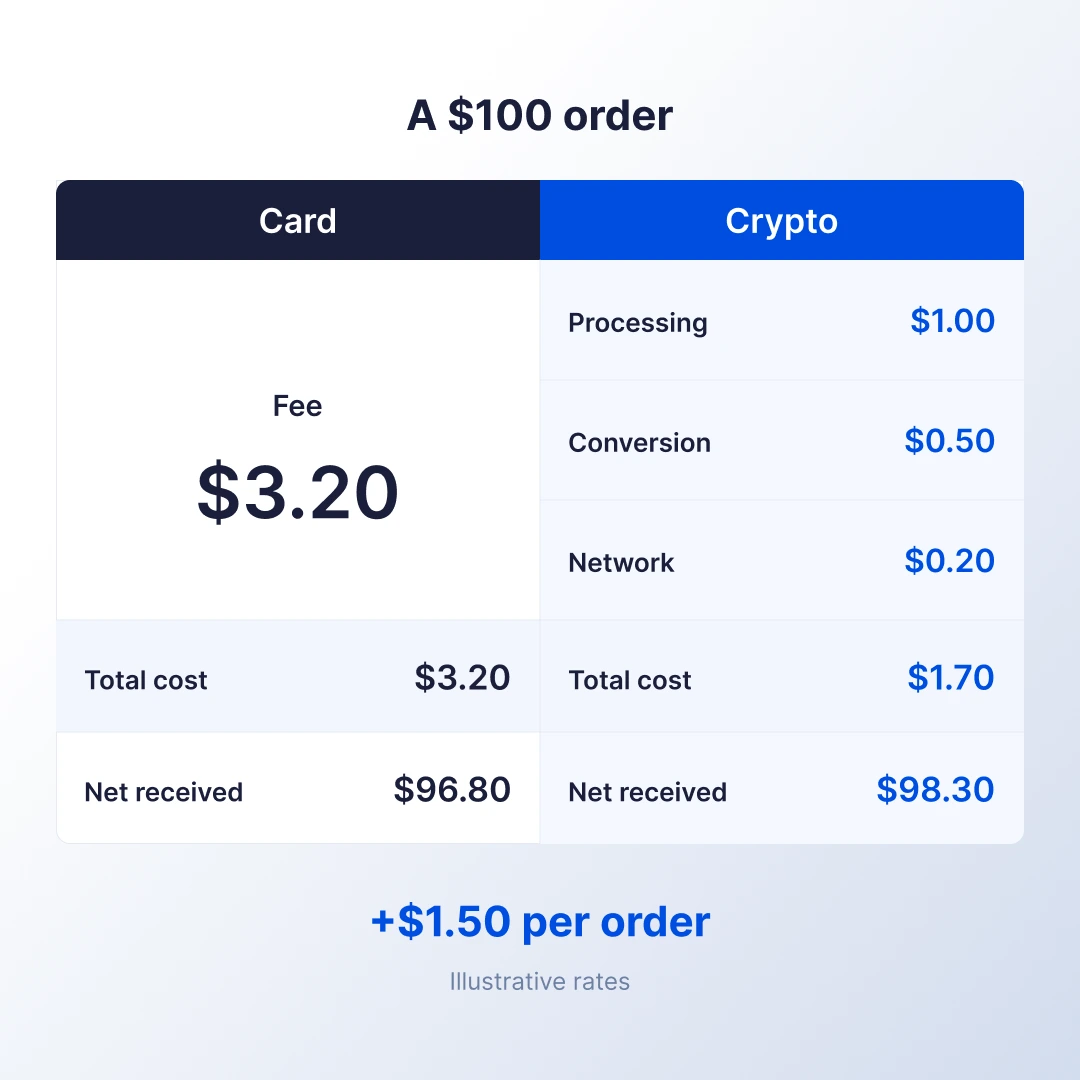
Comparison of cryptocurrency payment costs for a $100 order on e-commerce platforms
The rates below are for illustrative purposes only. Please replace them with your providers' actual rates.
Net profit refers to the amount of money you receive from an order after deducting transaction fees. In this example, if you place an order using cryptocurrency, you could earn an additional $1.50 per transaction. However, the table only calculates transaction fees, and pilots also incur other costs:
This does not include network fees that customers pay when sending cryptocurrency. These fees are deducted directly from the customer's wallet.
It is also important to make sure you are comparing the same thing. It is difficult to directly compare US dollars in a bank account to cryptocurrency in an electronic wallet, so you need to calculate the amount of cryptocurrency after conversion and payout.
Track the entire process of a cryptocurrency payment, from payment to completion
A typical crypto e-commerce payment process has six steps. Each step is indicated by its corresponding status in parentheses on the COINPAYMENTS invoice.
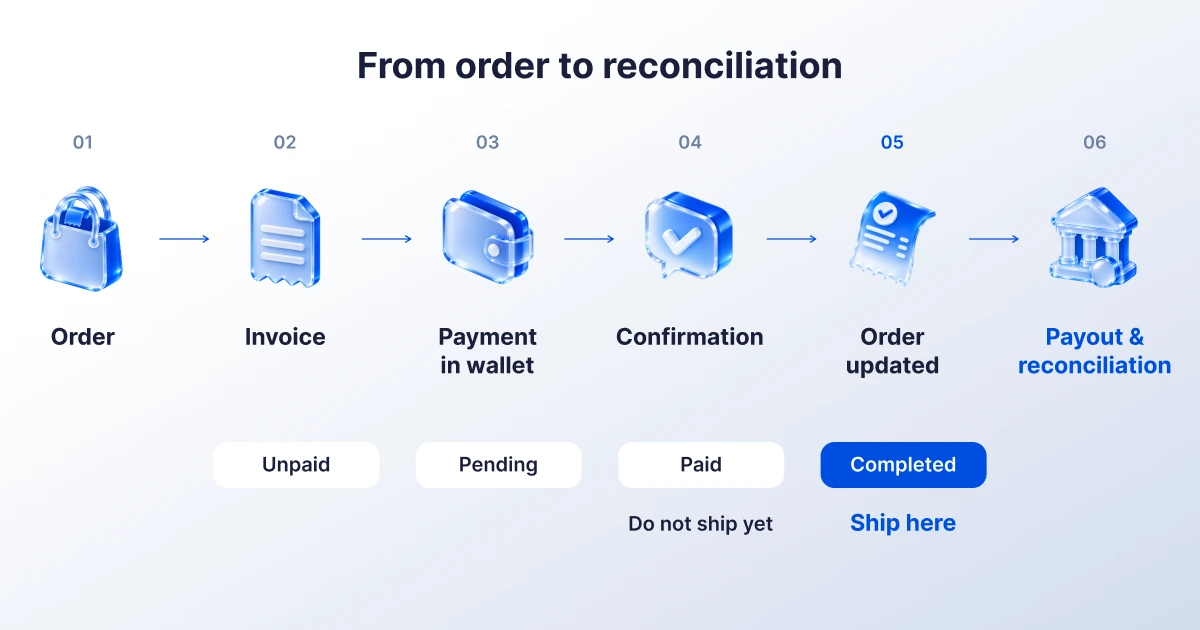
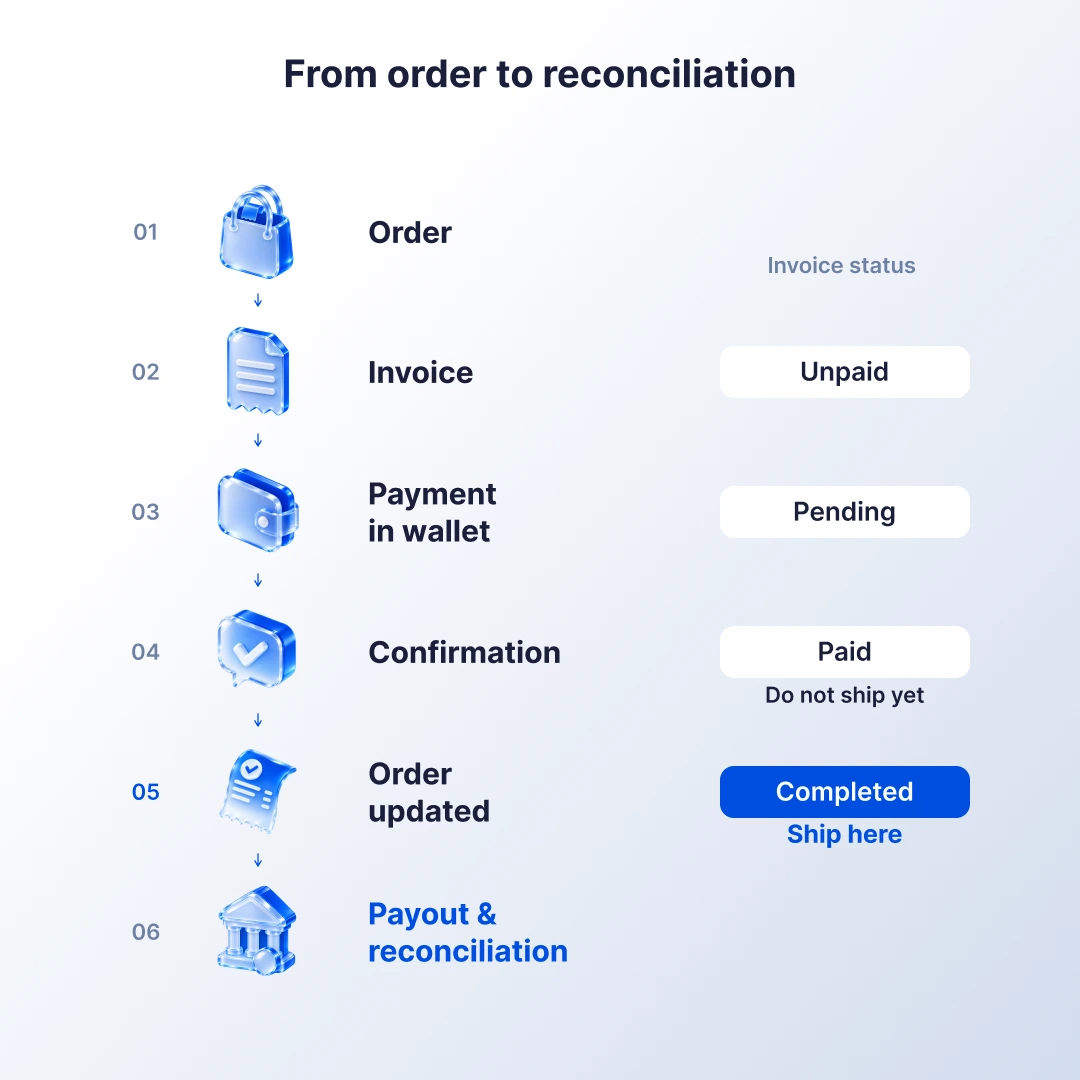
Deliveries are only processed securely when the transaction is marked "Completed". Until then, the payment is still on its way to your account balance, even if the invoice shows "Paid". The "Thank You" page provides less information, as it only indicates that the customer has completed the order. Transferring the "Completed" payment from your account balance to your bank account is a separate payout.
For a $100 order, the process might look like this: After the customer pays, the invoice status changes to "Pending" within seconds. After several confirmations, the status will change to "Paid," and once payment is received, the status will change to "Completed." Your store will mark the order as paid, and the warehouse will pack it.
Sometimes you may receive Webhook notifications twice, so please make sure a duplicate message can't trigger a second shipment. The speed of payout depends on the currency, payment method, and your bank.
Choose the COINPAYMENTS integration solution and test the order process
There are three main ways to connect your store to COINPAYMENTS. The COINPAYMENTS integration options guide explains each one.
Regardless of which crypto payment gateway you choose for e-commerce payments, please follow these steps before officially launching.
Before going live, please consult the COINPAYMENTS team regarding your payment method and fees.
Manage payment errors, refunds, and account reconciliations
Sooner or later, customers will pay less than the invoice amount, delay payment, or choose the wrong payment network. Decide now how your store should respond to each of these situations. You can refer to the table below.
COINPAYMENTS will take care of some of these things for you. The quoted price is locked for 60 minutes. Any payments made after this will be automatically refunded to the customer. If the customer does not pay the full amount, the invoice will show "Partially Paid". You can automatically accept small shortfalls up to the limit you set, or accept payments manually. If a customer sends too much money, the invoice is completed and the excess amount is refunded after deducting network fees.
A cryptocurrency refund is a payment you send yourself. Cryptocurrency payments are generally irreversible, so customers will only receive their funds after you issue a refund. Before you receive the first refund request, please answer a few questions: Will you refund in the original currency or in USD? Will you refund based on the exchange rate on the day of purchase or the exchange rate on the day of refund? Who will pay for the network fee? How will you verify the customer's wallet address? Please include the answers to these questions in your refund policy.
Cryptocurrency orders can't be charged back. However, dissatisfied customers will still contact you, and consumer protection laws still apply.
In your ledger, please store the order and invoice IDs, currency and network, transaction ID, payment arrival time, USD value, fees, any conversion details, and payment history. The IRS considers digital assets to be property. Your business is required to record the fair market value in US dollars for any cryptocurrency received. In addition, please keep a record of the date you received, sold, or exchanged the cryptocurrency. Your accountant will need this information.
Is accepting cryptocurrency cheaper than accepting credit cards?
Yes, this is generally true. Payments with bank cards typically have around 3% in fees, while cryptocurrency payments avoid bank card network fees and chargeback risks. Whether you actually save money depends on your processing and conversion fees, as well as the time required for refunds and customer support, so please calculate it on a per-order basis.
Taking the $100 order example mentioned above, each crypto order yields $1.50 more profit than a regular currency order. For a recalculation with real numbers, please see the COINPAYMENTS coins and fees page.
Can businesses accept Bitcoin payments and receive payments in US dollars?
Yes. When a customer pays in Bitcoin, the payment processor will convert the Bitcoin into USD or stablecoins, depending on the processor and your location, before issuing the payment to you. Since you never hold any Bitcoin, even if the price of Bitcoin drops after the transaction is completed, it will not affect the amount you ultimately receive.
You can also keep your Bitcoin if you want. To see how buyers pay, please read our guide on how to pay with Bitcoin.
When should orders paid with cryptocurrency be sent?
Once the payment is confirmed and the funds are received, the goods can be shipped. In the COINPAYMENTS system, this indicates that the payment status is "Completed". Simply showing a success page or a "Pending" status is not enough, as unconfirmed transactions can still fail or occur after the invoice has expired.
Configure your store so that a "Completed" webhook triggers the order fulfillment process. The COINPAYMENTS invoice status will change from "Unpaid" to "Pending", "Paid" and "Completed". The documentation recommends "Completed" as the trigger for shipment.
Can you refund a crypto payment?
Yes, but you will need to complete the process by making a new payment to the customer. Transactions confirmed on the blockchain cannot be changed, so there is no undo button. Your refund policy should clearly state the refund currency, the exchange rate, and who will pay the network fees.
COINPAYMENTS will automatically refund late payments and overpayments. Customers will receive an email with a claim link and will be asked to enter their wallet address. No refunds will be issued if the amount is less than the network fee.
Start with a measured checkout pilot
Start small. Spend a month or two tracking the number of cryptocurrency payments made, net profit per order, confirmation time, and time spent with customer service and refunds. This data is usually enough to determine whether cryptocurrency e-commerce payments should be maintained in your payment processing.